Compose Multiplatform for iOS is stable. Should you share your UI now?
Compose Multiplatform for iOS has been stable since May 2025. Here's when sharing UI between Android and iOS pays off, and when native SwiftUI still wins.
4 min read
For years, the standard advice on Kotlin Multiplatform was simple: share your logic, keep your UI native. Write the networking, storage, and business rules once in Kotlin, then build the screens twice — Jetpack Compose on Android, SwiftUI on iOS.
That advice made sense. Compose on iOS was experimental, and nobody wanted to bet a production app on it.
Then, in May 2025, JetBrains released Compose Multiplatform 1.8.0 and marked Compose for iOS as stable and production-ready. So the question isn't "can I share UI?" anymore. It's "should I?"
Here's how I think about it.
What "stable" actually means
Stable doesn't mean "identical to SwiftUI." It means the API won't break under you, JetBrains supports it for production use, and the rough edges are known and documented.
A few numbers from JetBrains' own announcement are worth knowing:
- A Compose Multiplatform iOS app adds roughly 9 MB compared to a fully native SwiftUI app. That's the Kotlin runtime and the Compose rendering layer.
- Accessibility (VoiceOver), native-feeling scrolling, and interop with SwiftUI and UIKit are part of the stable release, not afterthoughts.
Nine megabytes is real, but for most apps it's a reasonable price for not building every screen twice.
The two ways to use Kotlin Multiplatform
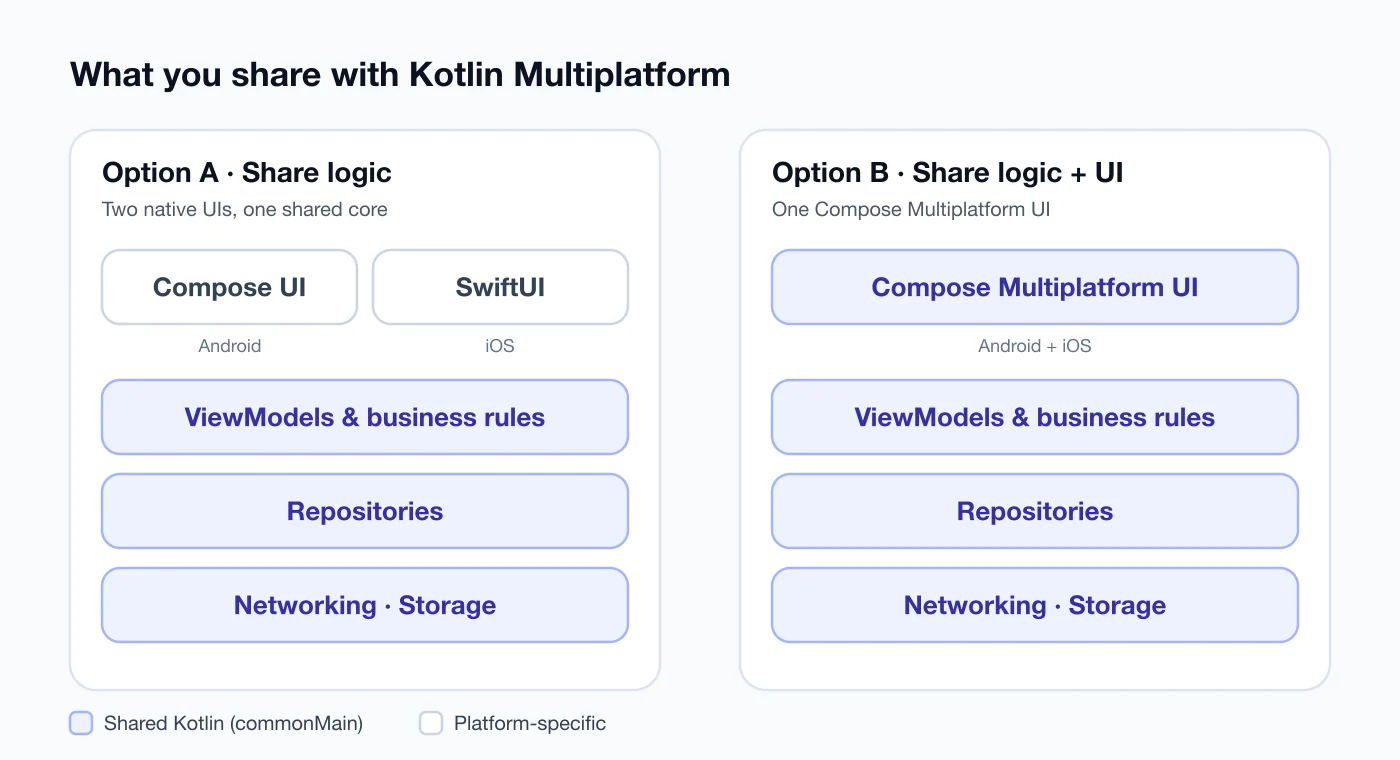
Option A — share logic only. Your commonMain holds the data layer and business rules. Android gets a Compose UI; iOS gets a SwiftUI UI. You write two UIs, but each one feels 100% native.
Option B — share logic and UI. Compose Multiplatform renders the same screens on both platforms. One UI codebase, one design system, one set of bugs to fix.
There's no single right answer. It depends on your app and your team.
When sharing the UI makes sense
I'd lean towards Option B when:
- The team is small. If one or two people build the whole app, writing every screen twice is the biggest cost you have.
- The team already knows Jetpack Compose. Android developers can be productive on iOS almost immediately.
- The app is mostly lists, forms, and content. Think dashboards, internal tools, ERP-style apps, readers. This kind of UI looks great in Compose on both platforms.
- You want one design across platforms. If your brand matters more than platform conventions, a shared UI keeps everything consistent.
When native SwiftUI still wins
I'd keep the UI native when:
- The app leans on iOS-only features. Home screen widgets (WidgetKit) and Live Activities are built with SwiftUI, so those parts stay native no matter what.
- Animations and gestures are the product. If your app's feel is its selling point, native UI gives you full control.
- You have dedicated iOS developers. If they love SwiftUI, forcing Compose on them is a fight you don't need.
You don't have to choose all at once
This is the part people miss. Compose Multiplatform interoperates with SwiftUI and UIKit in both directions, so you can mix them.
On iOS, a Compose screen is just a UIViewController:
// iosMain
fun MainViewController() = ComposeUIViewController { App() }
And on the Swift side you show it like any other view controller:
struct ComposeView: UIViewControllerRepresentable {
    func makeUIViewController(context: Context) -> UIViewController {
        MainViewControllerKt.MainViewController()
    }
    func updateUIViewController(_ vc: UIViewController, context: Context) {}
}
That means a realistic path looks like this: share your logic first, then move one simple screen — settings, a list, an about page — to Compose Multiplatform. If it feels right, move more. If it doesn't, you've lost a day, not a quarter.
Where I stand
I've built the same app twice: Books My Friend in Kotlin for Android and again in Swift for iOS. Two languages, two codebases, the same screens and the same logic — that duplication is exactly what Kotlin Multiplatform exists to remove.
That's why my newer cross-platform work, like my to-do app, starts with Kotlin Multiplatform and a shared core. For a small team or a solo developer, I now think sharing UI with Compose Multiplatform is a sensible default for content-heavy apps — with native SwiftUI kept for the few places where iOS really needs it.
A practical starting checklist
- Start a new project with the Kotlin Multiplatform wizard so the Gradle setup is correct from day one.
- Put your models, networking, and storage in
commonMainfirst. That's a win even if you never share UI. - Check the compatibility page for the Kotlin and Compose versions that go together.
- Move one low-risk screen to Compose Multiplatform and test it on a real iPhone, not just the simulator.
- Measure app size and scrolling performance before you commit the rest of the app.
The old rule — "share logic, never UI" — was right for its time. In 2026, it's just one of two good options.
Sources
- Compose Multiplatform 1.8.0 released: Compose Multiplatform for iOS is stable and production-ready — JetBrains
- Compatibility and versioning — Kotlin Multiplatform docs
Keep reading
All posts
Swift 6 strict concurrency: a calm, step-by-step migration
Swift 6 turns data races into compile errors. Here's a step-by-step way to move an existing iOS app without drowning in warnings, plus what Swift 6.2 changed.
4 min read

On-device AI in mobile apps: Gemini Nano vs Apple's Foundation Models
Android and iOS both ship a language model on the phone now. What Gemini Nano and Apple's Foundation Models can do, where they fall short, and how to start.
4 min read

Android 16 and API level 36: what the Google Play deadline changes
New Play apps and updates must now target Android 16 (API 36), and 16 KB page sizes come next. Here's what changes and a checklist to get your app ready.
4 min read
Comments
No comments yet — start the conversation.