Swift 6 strict concurrency: a calm, step-by-step migration
Swift 6 turns data races into compile errors. Here's a step-by-step way to move an existing iOS app without drowning in warnings, plus what Swift 6.2 changed.
4 min read
The first time you switch an existing iOS project to the Swift 6 language mode, it's a shock. A project that built cleanly yesterday suddenly shows a wall of errors about Sendable, actors, and "data races."
It looks bad, but it's fixable — and the errors point at real bugs. Here's a calm, step-by-step way through it, plus what Swift 6.2 changed to make it easier.
What Swift 6 actually changed
A data race happens when two threads touch the same data at the same time and at least one of them writes to it. These bugs are nasty: random crashes, corrupted state, and failures you can never reproduce on your own phone.
Swift 6 makes data-race safety part of the compiler. In the Swift 6 language mode, code that could race isn't a warning anymore — it's an error. The compiler now proves your concurrent code is safe before it lets you ship it.
That's the whole idea. Every error is the compiler saying: "I can't prove this is safe."
Migrate in steps, not all at once
The worst way to migrate is to flip a large project straight to Swift 6 mode and stare at 400 errors. Apple's own guidance is to climb gradually, using the Strict Concurrency Checking build setting in Swift 5 mode first.
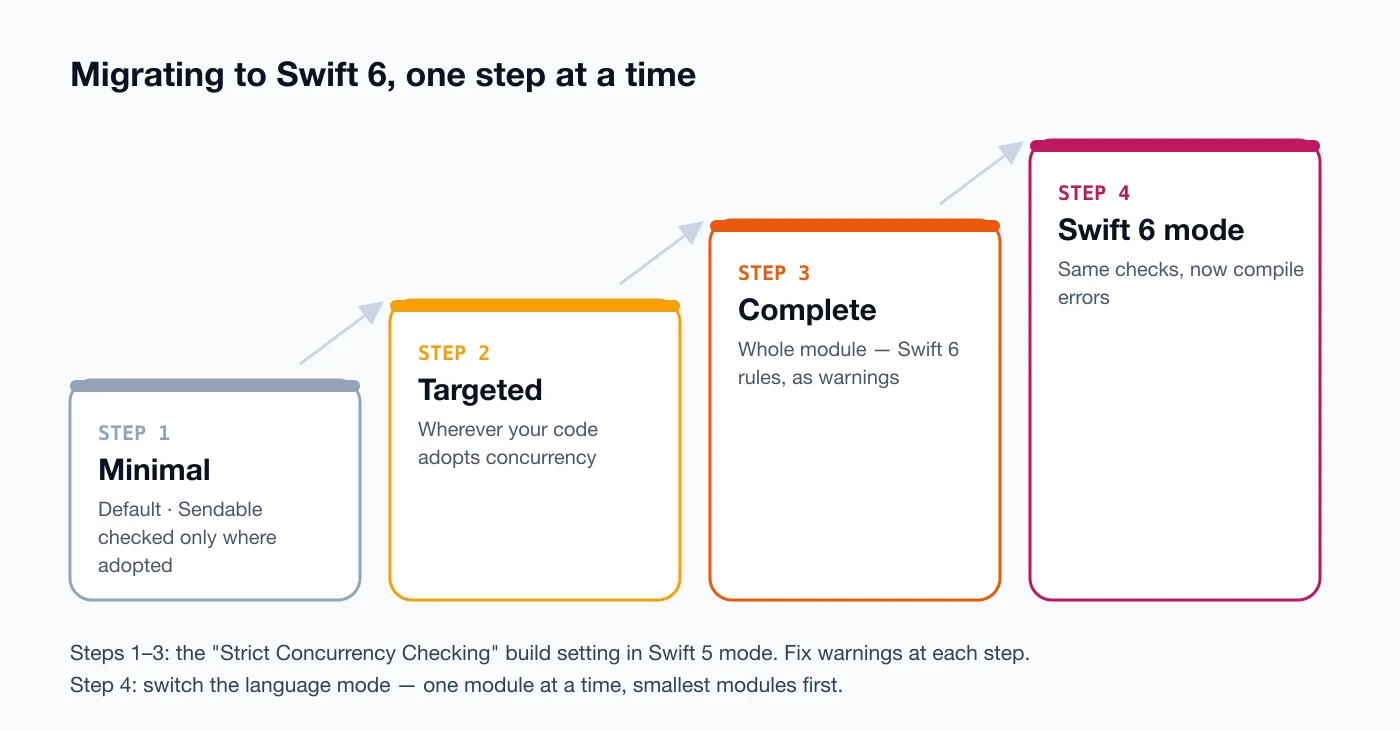
- Minimal — the default.
Sendableis only enforced where you've explicitly adopted it. - Targeted — checks everywhere your code has adopted concurrency (
async/await, actors,Sendable). Fix these warnings first. - Complete — checks the whole module, exactly like Swift 6 mode, but still as warnings.
- Swift 6 language mode — once the warnings are gone, switch the module over and they become errors that keep you safe from now on.
Do it one module at a time, starting with the small ones at the bottom of your dependency graph. Each module you finish stays finished.
The fixes you'll use most
Most warnings fall into a few patterns.
1. UI code belongs on the main actor. View models and anything that touches UI should say so:
@MainActor
final class LibraryViewModel: ObservableObject {
    @Published var books: [Book] = []

    func load() async {
        books = await repository.fetchBooks()
    }
}
2. Prefer value types for data you pass around. A struct whose properties are all Sendable is automatically Sendable when it's not public — so models can cross threads safely without any extra work:
struct Book: Identifiable, Hashable {
    let id: UUID
    let title: String
    let author: String
}
3. Put shared mutable state in an actor. If several tasks really do need to change the same data, an actor makes access one-at-a-time by design:
actor ImageCache {
    private var images: [URL: UIImage] = [:]

    func image(for url: URL) -> UIImage? { images[url] }
    func store(_ image: UIImage, for url: URL) { images[url] = image }
}
4. Old dependencies: if a library you depend on hasn't been updated for Swift 6 yet, @preconcurrency import quiets its warnings while you wait for an update. Use it as a temporary bridge, not a permanent fix.
What Swift 6.2 made easier
Swift 6.2 (released in September 2025) introduced what the Swift team calls approachable concurrency. Two changes matter most for app developers:
- Main actor by default. You can choose to isolate a whole module to the main actor, without writing
@MainActoreverywhere. For app targets — where most code runs on the main thread anyway — this removes a huge amount of annotation noise. - Async functions stay where they're called. With the new upcoming feature enabled, a
nonisolatedasync function runs in the caller's context instead of jumping to a background thread. When you really do want work off the main actor, you mark it explicitly with@concurrent.
// Explicitly runs on the concurrent thread pool, off the main actor
@concurrent
func decodeLargeFeed(_ data: Data) async throws -> [Book] {
    try JSONDecoder().decode([Book].self, from: data)
}
The result: concurrency becomes opt-in where it matters, instead of a puzzle you have to solve on every line.
Why I'm glad this exists
I'm building the iOS version of Books My Friend in Swift, after first building it for Android in Kotlin. Loading book data, caching images, and updating the UI from async work is exactly where race bugs hide.
Having the compiler point at those spots before a user hits them is worth the extra effort up front.
A quick migration checklist
- Update to the latest Xcode and update your dependencies.
- Set Strict Concurrency Checking to Targeted and fix the warnings.
- Move UI types and view models to
@MainActor. - Make your models
structs withSendableproperties. - Move shared mutable state into actors.
- Raise checking to Complete and finish the remaining warnings.
- Switch to the Swift 6 language mode — one module at a time.
Take it slowly, module by module. The compiler is on your side here.
Sources
- Announcing Swift 6 — Swift.org
- Swift 6.2 Released — Swift.org
- Migrating to Swift 6 — Swift.org
- Migrate your app to Swift 6 (WWDC24) — Apple Developer
- SE-0461: Run nonisolated async functions on the caller's actor by default — Swift Evolution
Keep reading
All posts
Compose Multiplatform for iOS is stable. Should you share your UI now?
Compose Multiplatform for iOS has been stable since May 2025. Here's when sharing UI between Android and iOS pays off, and when native SwiftUI still wins.
4 min read
On-device AI in mobile apps: Gemini Nano vs Apple's Foundation Models
Android and iOS both ship a language model on the phone now. What Gemini Nano and Apple's Foundation Models can do, where they fall short, and how to start.
4 min read
Comments
No comments yet — start the conversation.