On-device AI in mobile apps: Gemini Nano vs Apple's Foundation Models
Android and iOS both ship a language model on the phone now. What Gemini Nano and Apple's Foundation Models can do, where they fall short, and how to start.
4 min read
A couple of years ago, adding AI to a mobile app meant one thing: send the user's text to a server, wait, and pay for every request.
That's no longer the only option. Both Android and iOS now ship a language model on the phone itself, and both give developers an API to use it. No server, no per-request bill, and the user's data never leaves the device.
I've been reading through both platforms' documentation to understand what's actually possible. Here's the short version.
Why on-device matters
Running a model on the device changes four things at once:
- Privacy. The text stays on the phone. For notes, messages, health data, or anything personal, that's a big deal.
- Offline. It works on a plane, in a basement, or on a bad connection.
- Cost. There's no API bill that grows with every user.
- Speed. No network round-trip, so short tasks feel instant.
The trade-off: these are small models. They're good at specific jobs, not at being a know-it-all chatbot.
Android: Gemini Nano through ML Kit
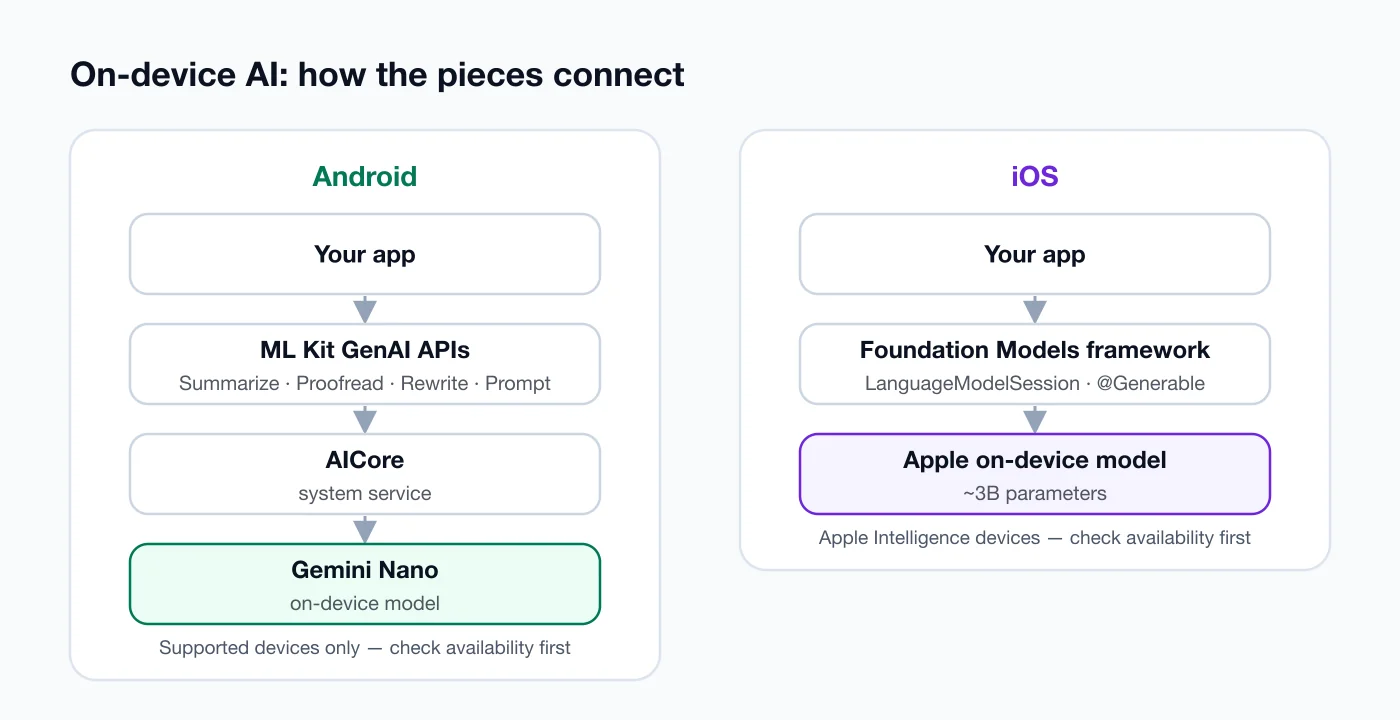
On Android, the on-device model is Gemini Nano. Apps don't load it themselves. It runs inside AICore, a system service, and developers reach it through the ML Kit GenAI APIs.
According to Google's documentation, the ready-made APIs cover:
- Summarization — turn a long article or chat thread into a few bullet points
- Proofreading — fix grammar and spelling
- Rewriting — change the tone or style of a message
- Image description — generate a short description of an image
There's also a lower-level Prompt API if you need something the task APIs don't cover.
The catch: Gemini Nano only runs on supported devices. Your app must check whether the feature is available — and possibly downloadable — before showing it to the user.
iOS: Apple's Foundation Models framework
On iOS, Apple introduced the Foundation Models framework at WWDC 2025. It gives Swift code direct access to the on-device model behind Apple Intelligence — according to Apple's machine learning research team, a model of roughly 3 billion parameters.
The feature I like most is guided generation. Instead of asking for text and then parsing it, you describe a Swift type and the model fills it in:
import FoundationModels

@Generable
struct ReadingNote {
    @Guide(description: "A one-sentence summary of the passage")
    var summary: String

    @Guide(description: "Up to three key ideas, each a short phrase")
    var keyIdeas: [String]
}

let session = LanguageModelSession()
let response = try await session.respond(
    to: "Summarize this passage: \(passage)",
    generating: ReadingNote.self
)

print(response.content.summary)
Apple explains that the system uses constrained decoding, so the output is guaranteed to match your type. No more broken JSON.
Apple is also clear about the limits: the on-device model is tuned for tasks like summarization, extraction, and classification. It isn't meant for world knowledge or advanced reasoning.
So which tasks actually fit?
Both platforms point to the same sweet spot. On-device models are great at working with text the user already has:
- Summarizing a long note, email, or chapter
- Pulling out structured data — dates, names, to-do items
- Tagging or categorizing content
- Suggesting a shorter or friendlier rewrite
They're a poor fit for answering factual questions ("Who won the 2018 World Cup?"), where small models can confidently make things up.
When I think about my reading app, Books My Friend, the obvious use is exactly this kind of task: summarising a chapter or pulling out its key ideas — the user's own text, processed privately on their own phone.
Five rules if you're adding it to your app
- Feature-detect first. Not every device supports these models. Check availability and hide the feature cleanly when it's missing.
- Always have a fallback. Either a simpler non-AI path or a clear message. Never a broken button.
- Keep prompts small. On-device models have limited context. Send the relevant chunk, not the whole document.
- Use structured output. On iOS,
@Generabletypes. On Android, ask for a specific format and validate it. - Be honest in the UI. Label AI-generated text, and let users edit it. A summary is a suggestion, not the truth.
The bottom line
On-device AI isn't a gimmick anymore. On both platforms it's a supported, documented API that's good at a specific set of jobs: summarize, extract, classify, rewrite.
If your app handles user text, there's probably one feature where an on-device model saves your users real time — privately, offline, and without a server bill. Start with that one feature.
Sources
- Gemini Nano and AICore — Android Developers
- Build intelligent experiences on Android with AI — Android Developers
- Foundation Models framework — Apple Developer
- Meet the Foundation Models framework (WWDC25) — Apple Developer
- Updates to Apple's On-Device and Server Foundation Language Models — Apple Machine Learning Research
Keep reading
All posts
Compose Multiplatform for iOS is stable. Should you share your UI now?
Compose Multiplatform for iOS has been stable since May 2025. Here's when sharing UI between Android and iOS pays off, and when native SwiftUI still wins.
4 min read
Swift 6 strict concurrency: a calm, step-by-step migration
Swift 6 turns data races into compile errors. Here's a step-by-step way to move an existing iOS app without drowning in warnings, plus what Swift 6.2 changed.
4 min read
Comments
No comments yet — start the conversation.